

Baby Monitor No Wifi: A Practical Buyer's Guide

A new parent can stand in a freshly painted nursery with a phone in one hand and a boxed baby monitor in the other, wondering whether the camera should join the home router or stay completely offline. That choice affects more than privacy. It can determine whether monitoring continues during an outage, whether a signal reaches a bedroom across the house, and whether a caregiver must carry a dedicated screen or rely on a phone.
A baby monitor no WiFi setup is best understood as a connectivity decision. It trades remote access and app-based features for a direct local connection that can be simpler, more predictable, and less dependent on broadband. The right choice depends on the home's walls, floors, layout, internet reliability, and the kind of reassurance the family wants.
Table of Contents
- What a Baby Monitor No Wifi Means
- How Non-Wifi Monitors Connect Without the Internet
- No Wifi vs Wifi Baby Monitors Compared
- Key Features to Evaluate Before You Buy
- Setup and Quick Troubleshooting
- Safety, EMF, and Smart Placement Habits
- Choosing the Right Monitor for Your Family
What a Baby Monitor No Wifi Means
A no-WiFi baby monitor sends audio or video directly from the baby unit to a matched parent unit through its own radio connection. The camera does not join the household router, upload footage to the cloud, or require internet access for the handheld screen to show the nursery.
That design makes the monitor local rather than remote. A parent in an upstairs bedroom may receive a clear signal, while a caregiver checking from work cannot open the feed on a phone. There is no cloud streaming, smartphone app for viewing away from home, or remote access during travel. Over-the-air firmware updates are also generally unavailable, so updates and configuration follow the manufacturer's instructions for that model.
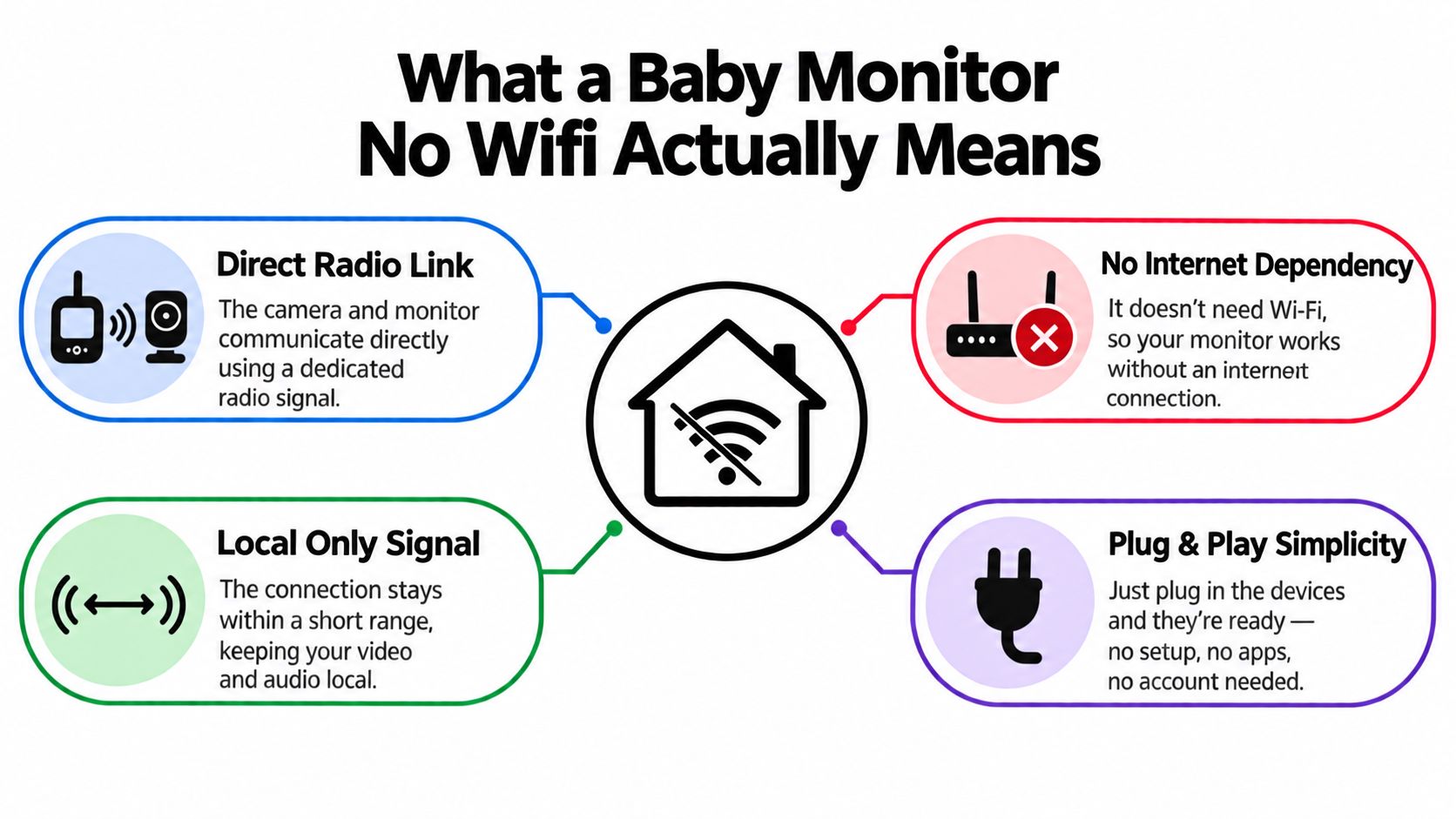
The local signal path
The baby unit captures sound or video, converts it into a radio transmission, and sends it to the paired parent unit. The parent carries a handheld screen or audio receiver through the home, while walls, floors, distance, and the building's layout shape how well that local link holds.
An apartment with nearby networks, a rural home with greater distance between rooms, and a multi-story house can produce different results from the same monitor. Range claims matter, but the signal still has to pass through the materials and spaces between camera and parent unit.
Common connection types include DECT, FHSS, and older analog links. They remain wireless technologies, so “no WiFi” means no WiFi protocol, not no radio transmission. Any monitor that sends audio or video between rooms uses radio frequency energy, and no-WiFi models commonly use DECT or FHSS (Fathercraft's explanation of no-WiFi monitor safety).
Practical rule: “No WiFi” describes the connection method, not the absence of wireless signals.
Baby monitors have a long history. The category dates back to 1937, when the first products were invented and released, with early units using analog audio over low-frequency bands. Later digital designs improved clarity and reduced some limitations. Today's local RF and DECT products retain the same basic idea, a direct nursery-to-parent connection (baby monitor market history and outlook).
How Non-Wifi Monitors Connect Without the Internet
Picture a multi-story home where the router signal weakens upstairs. A no-WiFi monitor uses its own radio connection, like a private lane between the camera and its paired parent unit. Pairing may happen at the factory or with a one-time button press. The parent unit then receives audio or video directly, without sending it through the internet.
DECT, FHSS, and analog links
DECT 6.0 usually operates in the 1.88–1.90 GHz band, separate from common 2.4 GHz WiFi and Bluetooth traffic (DECT frequency and range explanation). That separation can reduce competition with nearby devices and support a steadier voice link. Philips marketing documentation claims “zero interference” from transmitters such as cordless and mobile phones. Treat that wording as a vendor claim, not an independent test result. Consumer specifications often describe indoor coverage around 50 m and outdoor coverage around 300–330 m, or about 1,000 ft in some U.S. listings.
FHSS, or Frequency-Hopping Spread Spectrum, works like a conversation that changes lanes quickly. The camera and parent unit move between frequencies according to a shared pattern, maintaining a local connection without a router or app (FHSS baby monitor overview). This can suit an apartment with crowded wireless traffic, although walls, floors, and the building's materials still affect the usable range.
Older analog 2.4 GHz models resemble a basic cordless phone. They are straightforward, but routers, microwaves, and other nearby devices can introduce more static than newer digital designs.
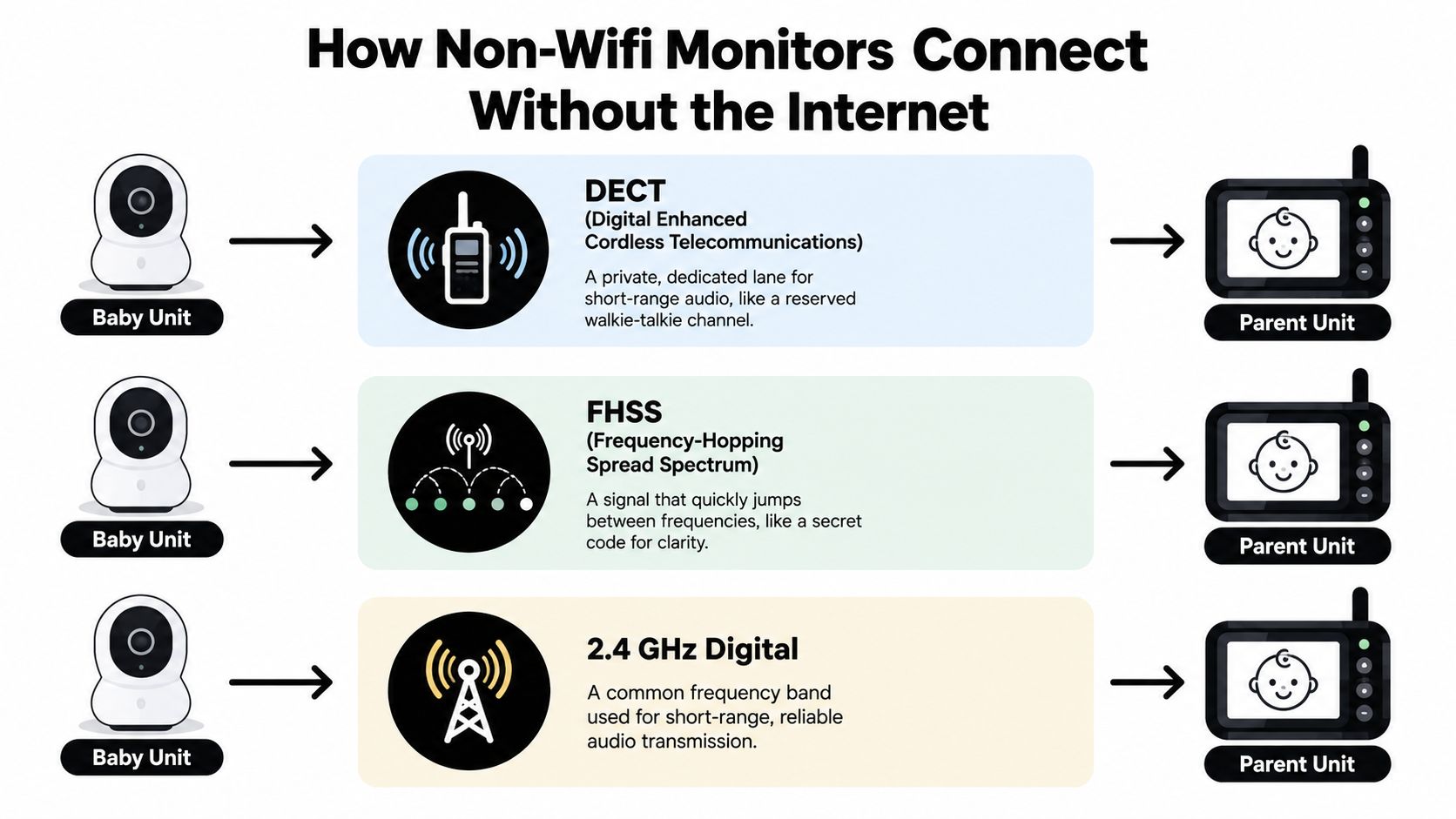
What the connection doesn't need
The parent and baby units do not need an SSID, router password, cloud account, or home-network integration. That helps in a rural house with unreliable broadband, a guest room beyond strong router coverage, or a rental where the WiFi password is unavailable.
The trade-off is simple. The parent must remain within the monitor's effective local range, and the system cannot send a phone alert to someone who has left the property. A private radio link works inside the home. It does not provide remote access. Walls and floor count matter as much as the headline range, so test placement in the rooms where the monitor will be used.
No Wifi vs Wifi Baby Monitors Compared
Neither category wins every household. A no-WiFi monitor keeps the connection local and usually responds quickly because the signal doesn't need to travel through a router, internet service, and cloud platform before reaching a phone. A WiFi model, however, can offer remote viewing, smart alerts, sleep analytics, and access for multiple caregivers through an app.
The difference becomes clearer when the home's connectivity and layout enter the decision. A dedicated radio may work predictably through ordinary interior walls, while brick, thick plaster, multiple floors, or dense apartment interference can create dead zones. A WiFi camera connected to a well-placed mesh system may cover those areas more effectively, though that setup adds network dependence.
| Factor | No-WiFi Monitor | WiFi Monitor |
|---|---|---|
| Privacy | Keeps the video and audio on a local device path, with no cloud account required for basic operation | Depends on the manufacturer's account security, encryption, software updates, and vulnerability response |
| Internet outages | Continues working without broadband or a router | Remote features may stop when the network or internet connection fails |
| Range | Depends on the dedicated radio, wall materials, floor count, and antenna placement | Can cover larger areas through a strong home network, but weak WiFi still creates gaps |
| Latency | Usually feels immediate because the camera connects directly to the parent unit | Can introduce delay through router and cloud connections |
| Features | Commonly focuses on sound, video, two-way talk, temperature readings, and local alerts | Often adds phone access, smart notifications, analytics, and multi-user viewing |
| Upfront cost | Usually simpler and often lower at purchase, with no app subscription required for local monitoring | May cost more or add ongoing service charges for advanced features |
| Caregiver access | Requires carrying or sharing the dedicated parent unit | Allows approved users to view through phones, depending on the product |
Security isn't only a marketing label. Consumer Reports describes baby-monitor data security through authentication, encryption, software updates, and vulnerability response, concerns that matter most when a monitor has an internet-facing path (Consumer Reports baby-monitor security discussion). Families comparing recording features can also review baby monitors that record before choosing between local storage and app-based access.
For a small home with dependable walls and one caregiver, local monitoring can be the calmer arrangement. For a caregiver who needs alerts while outside, WiFi access may justify the added complexity.
Key Features to Evaluate Before You Buy
A product box can list an impressive range, sharp video, and long battery life, but the nursery's construction determines whether those claims feel useful. Buyers should evaluate the monitor as a system, not as a collection of isolated specifications.
Range and home layout
Range changes with wall material, floor count, furniture, and interference. An advertised outdoor distance doesn't guarantee the same result through plaster, brick, metal framing, or several ceilings. In a multi-story house, the camera may reach a parent unit across a hallway but struggle diagonally through floors.
A rural property may benefit from a longer local link because the parent might move between the nursery, kitchen, porch, and yard. An apartment may need a cleaner radio standard and careful placement because neighboring electronics can crowd the same space.
Audio, video, and battery
Audio-only monitoring suits caregivers who mainly need to hear crying and want a smaller, simpler parent unit. Video earns its space when a caregiver wants to check position, movement, or whether a noise came from the crib or the room.
Battery life deserves equal attention. Tested parent units have ranged from about 14 hours to 30 hours on a charge, while another review found many average under 10 hours, with the strongest lasting nearly 27 hours and the weakest lasting under 3 hours (parent-unit battery-life testing). Screen brightness, continuous video, night lights, and weak-signal conditions can drain the unit faster.
Security, standards, and growth
DECT and FHSS are useful standards to understand, but buyers should still check pairing behavior, whether the signal is encrypted, and whether the system supports secure camera additions. Expandability matters when a family expects another nursery, wants two viewing angles, or needs an audio-only receiver in another room.
| Feature | What to look for | Red flag |
|---|---|---|
| Range | Testing guidance that considers walls, floors, and indoor conditions | A large outdoor figure with no explanation of indoor performance |
| Audio or video quality | Clear sound for everyday monitoring, with video detail suited to the room | A sharp-looking specification without usable night vision or dependable audio |
| Battery | A replaceable or serviceable battery, clear runtime guidance, and a charging indicator | A parent unit that requires constant charging or provides vague battery information |
| Encryption and radio standard | DECT or FHSS, secure pairing, and clear documentation | Unclear pairing instructions or unexplained radio behavior |
| Expandability | Support for extra cameras, multiple views, or additional receivers | A closed system that can't adapt when the family's needs change |
A useful next step is to compare screen size, radio type, camera support, controls, and power options in this baby-monitor comparison guide. The best model is the one whose weakest practical feature won't disrupt the household routine.
Setup and Quick Troubleshooting
Most local monitors are designed to work without network configuration. A careful first setup can move from an unopened box to a tested nursery connection in under 15 minutes, provided both units are charged and the instructions are nearby.
A simple first setup
- Unbox both units. Remove protective film, identify the camera power adapter, and locate the pairing or link button.
- Plug in the baby unit. Position it on a stable shelf or wall mount, outside the crib, before switching it on.
- Power the parent unit. Charge it, remove any battery tab, and turn it on.
- Pair the units. Use the included pairing process, often a button press or a simultaneous hold on both devices.
- Position and test. Walk through the rooms where the caregiver will spend time, check the picture, listen for audio, and test two-way talk.
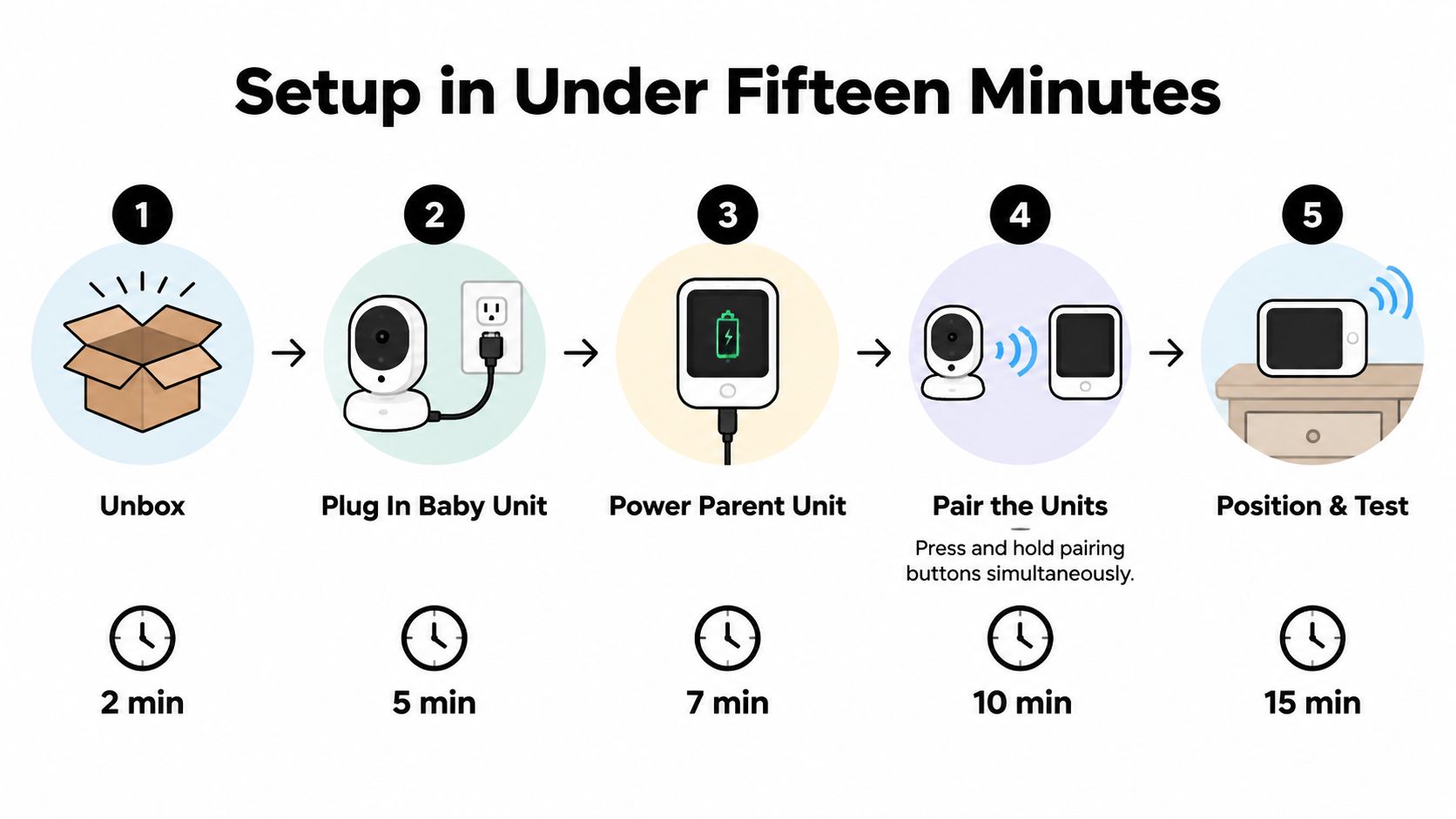
Fix the common problems first
Static or dropouts often respond to a simple location change. Move the camera or parent unit away from a microwave, router, cordless-phone base, or other electronics, then try another channel if the model offers one.
If the parent unit won't power on, reseat the charging cable and check the battery tab. If pairing fails, switch both units off, turn them back on, and hold the link button according to the manual.
Blurry night vision usually comes from a dirty infrared lens or a nearby reflective object. Wipe the lens gently and move reflective toys, glass, or shiny décor away from the camera's view.
Audio that cuts out at the edge of the home may improve when the parent unit's antenna is raised and obstacles are reduced. Test the connection from the exact chair, bedroom, or yard area where monitoring will happen, rather than relying only on the box's range statement.
Small test, big benefit: Walk the real route through the home before the first night. A monitor that works beside the camera may behave differently across a floor or behind a thick wall.
Safety, EMF, and Smart Placement Habits
A monitor may work without the internet and still transmit radio-frequency energy. “No WiFi” describes how the units connect, not the absence of wireless signals. DECT and FHSS models communicate over radio, so sensible distance, secure cords, stable mounting, and careful charging all matter.
Keep the baby unit at least 3 to 6 feet from the crib. A shelf or wall mount keeps the camera close enough for a clear view while avoiding the physical risks of placing equipment inside the crib. The right location also depends on the home: thick walls, multiple floors, and long routes between rooms can weaken a local connection, especially in apartments with dense construction or rural homes with greater distances.
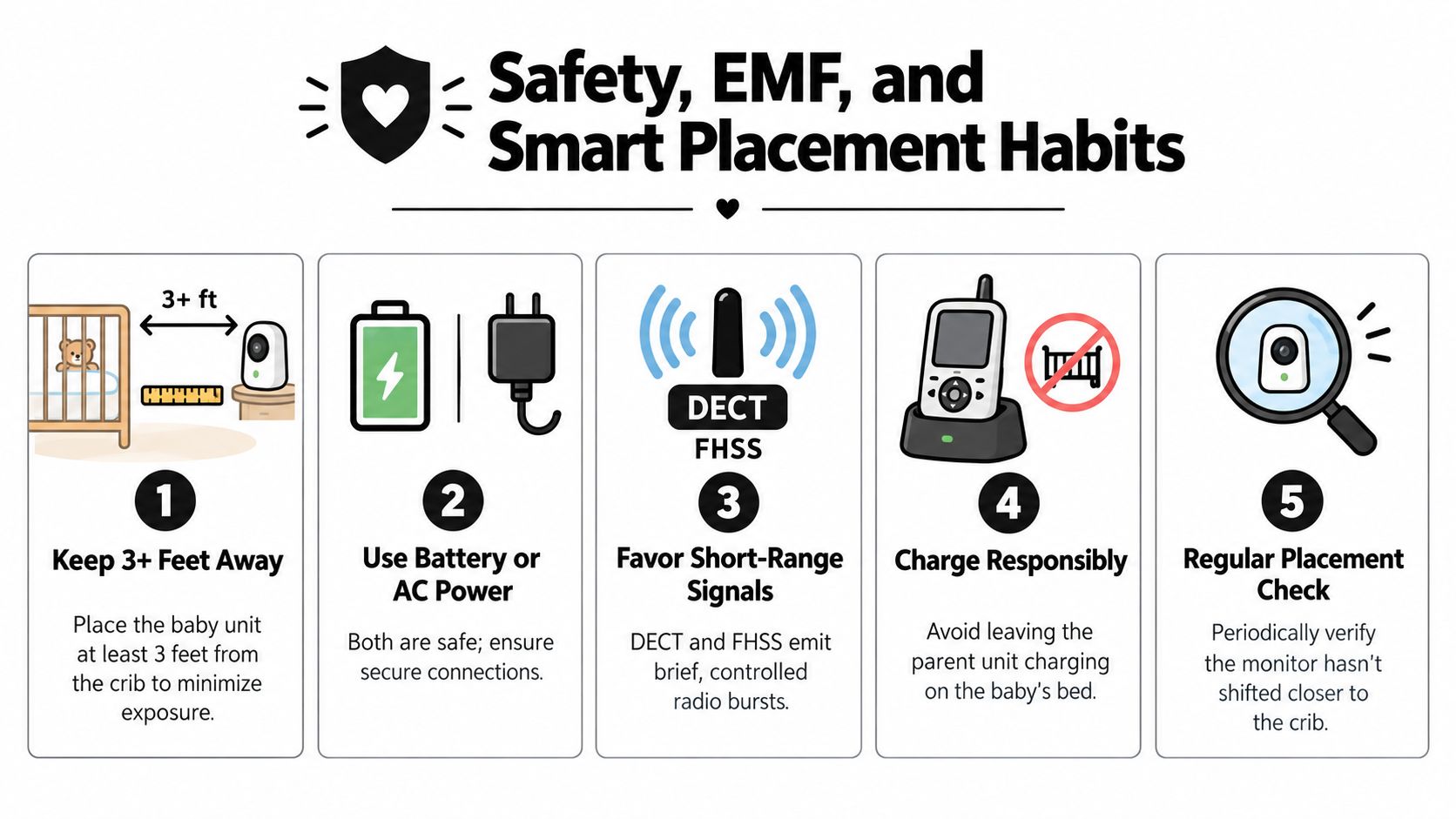
Keep the nursery physically safe
Cords deserve more attention than radio specifications. Route them away from the crib, window cords, and reachable furniture. Use supplied cable guards where available, and secure the camera's cable so a child cannot pull the unit down.
Place the parent unit on an adult surface, never on the baby's bed. Charge it away from the nursery when practical, and use the baby unit's manufacturer-approved power arrangement instead of improvised adapters.
A short nightly check can become routine:
- Distance: Confirm the camera has not shifted closer to the crib.
- Cord path: Check that cables remain secured and out of reach.
- Power: Verify that the parent unit has enough charge for the night.
- Signal: Test audio from the caregiver's usual sleeping or resting area.
- View: Confirm that the image covers the intended sleep space without glare.
These habits address two separate concerns: physical safety in the nursery and dependable coverage through the home. Test the monitor from the chair, bedroom, or floor where it will be used, because a connection beside the camera may behave differently behind a thick wall or across a staircase.
Choosing the Right Monitor for Your Family
The most suitable monitor matches the home and daily rhythm, not the longest feature list. A small apartment with one caregiver may need only a dependable DECT audio unit, while a multi-story house may benefit from a local video system with a strong stated range and a parent unit that can travel between floors.
Three questions narrow the decision quickly. First, how many walls and floors separate the nursery from the places where caregivers spend time? Second, does one person need to listen, or will several caregivers need access? Third, is visual reassurance important, or would clear audio reduce clutter and keep the routine simple?
Match the format to the routine
An audio monitor makes sense when simplicity, low power use, and minimal screen time matter most. Video is more useful when a caregiver wants to check the room without opening the door. A no-WiFi video unit keeps that visual check local, but it won't send an alert to a phone outside the house.
Travel changes the calculation. A monitor with a dedicated parent unit can work in a rural property, guest room, or rental without asking the caregiver to configure a new router. Families should still test the actual walls and distances, because a nominal range won't reveal every dead zone.
Granted Solutions lists practical child and baby products, including a Cdycam 3.5-inch Wireless Video Baby Monitor with a separate camera-and-receiver setup and night vision. Families comparing that type of product with other nursery essentials can also browse the baby sleep products collection before deciding whether video, audio, or a broader sleep setup fits the household.
The decision path is straightforward:
- Choose audio when the priority is simple sound monitoring and a compact local setup.
- Choose local video when visual reassurance matters but remote phone access doesn't.
- Choose WiFi when caregivers need off-site viewing, smart alerts, or shared phone access.
- Skip unnecessary upgrades when the home layout is simple and extra analytics would add distraction rather than reassurance.
Granted Solutions offers practical baby products, home essentials, and everyday gadgets that can support a simpler nursery setup, including local camera-and-receiver options for families comparing no-WiFi monitoring. Visit Granted Solutions to explore baby monitors and other problem-solving products for home, travel, and gifting.
Leave a comment