

Smart Glasses for Everyday Use: A Practical 2026 Guide

A crowded platform leaves little room for another device. One hand holds coffee, the other searches for a train pass, earbuds are disappearing into a pocket, and an unanswered call keeps vibrating on a phone that can't be reached easily. Smart glasses for everyday use aim to remove that small but repeated friction by putting calls, audio, cameras, AI assistance, or brief visual prompts closer to the person wearing them.
The category now covers far more than bulky experimental headsets. Market momentum is moving toward practical, lightweight eyewear. IDC reported that display-free smart glasses surged 167% year over year in Q1 2026, reaching about 2.25 million units, while its projection puts the category at 13.6 million units in 2026 and 27.3 million by 2030. Counterpoint also reported 83% year-over-year growth in global intelligent eyewear shipments in Q1 2026.
The practical question isn't whether smart glasses exist. It's whether a particular pair can survive a commute, work session, errands, and evening routine without becoming uncomfortable, socially awkward, or permanently attached to a charging case. The sections ahead focus on categories, real-day use, battery behavior, comfort, privacy, setup, and buying decisions.
Table of Contents
- Why Smart Glasses Fit Into Everyday Life Right Now
- What Smart Glasses for Everyday Use Actually Are
- A Real Day With Smart Glasses on Your Face
- Key Features That Matter for Daily Wear
- Honest Pros and Cons to Weigh Before Buying
- Setup and Care Tips for the First Week
- How to Choose the Right Pair for Your Routine
- Bringing Smart Glasses Into Your Everyday Setup
Why Smart Glasses Fit Into Everyday Life Right Now
Smart glasses fit daily routines because they handle small tasks without demanding a full screen. A wearer can answer a call, hear a podcast, capture a quick photo, or ask an assistant a short question while keeping attention on a walk, a child, a recipe, or a set of tools. That doesn't make the phone obsolete. It makes the phone less necessary for brief interactions.
The strongest everyday models look closer to familiar eyewear than science-fiction equipment. They combine frames with open-ear speakers, microphones, cameras, sensors, or a compact display, then use a phone and companion app for setup and many connected features. Meta describes its AI glasses as regular-looking eyewear with integrated speakers, microphones, cameras, and, in some models, displays.
Practical momentum, not futuristic theater
The market is increasingly favoring glasses that perform useful actions rather than immersive visual computing. Counterpoint says AI smart glasses accounted for 88% of global smart-glasses shipments in H2 2025, during a period when total shipments grew 139% year over year. That shift matters for buyers because audio, calls, capture, and voice assistance generally fit daily habits more naturally than a screen that tries to replace a phone.
Omdia projects that AI glasses will exceed 10 million units in 2026 and reach 35 million units by 2030. The projection also places China as the second-largest market after the United States, with 1.2 million units and 12% of global shipments in 2026. Those figures show category momentum, but they don't prove that every model belongs on every face.
Practical rule: A smart-glasses purchase should begin with the moments a phone makes awkward, not with the most impressive feature list.
For commuters, the best value may be open-ear audio. For creators and parents, a camera can matter more. For people who need captions, translations, or glanceable directions, a display may justify extra complexity. The right choice is practical and personal.
What Smart Glasses for Everyday Use Actually Are
Consumer smart glasses are eyewear with built-in technology. Depending on the design, that technology can include speakers, microphones, a camera, sensors, or a small display. Most pairs connect to a phone through Bluetooth or another wireless connection, with a companion app handling pairing, permissions, settings, updates, and content transfer.
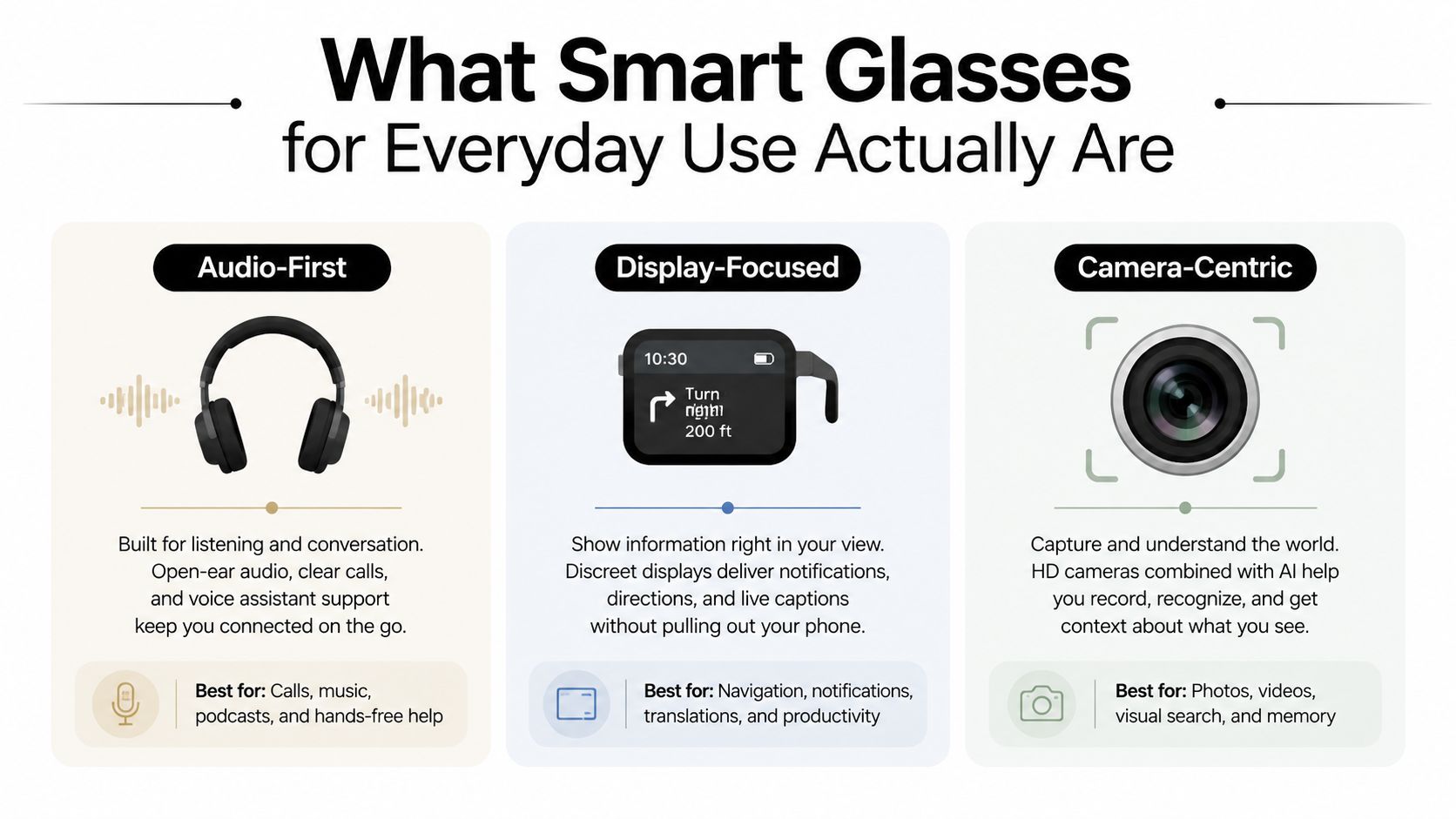
The phrase “smart glasses” hides three very different product families. Choosing among them is like choosing between earbuds, a smartwatch, and a laptop. Each can connect to the same digital life, but each is designed for a different slice of it.
Three categories, three reasons to buy
Audio-first glasses put speakers and microphones in the frame. They're suited to music, podcasts, calls, reminders, and voice assistants while leaving the ears open to surrounding sounds. These models are the easiest starting point for someone who wants hands-free convenience without a camera or screen.
Camera-and-AI glasses add a camera for first-person photos and video. They suit travelers, parents, creators, and anyone who wants to capture a moment without reaching for a phone. Their convenience comes with a privacy responsibility, because people nearby may wonder whether recording is active.
Display-focused glasses place short information in the wearer's field of view. Directions, captions, translations, notifications, and brief prompts can appear without a phone being raised. They aren't generally the right tool for long reading or cinema-style viewing.
Optics determine whether a display works outdoors. Vuzix documentation describes see-through waveguide systems with roughly 28° to 34° field of view, resolutions from 854x480 to 1920x1080, 60 Hz refresh, and brightness from 1000 to 5000 nits. Those specifications support legibility in ambient light, but the relatively narrow field of view favors short, glanceable information.
Prescription support varies by model. Buyers should verify whether a pair accepts prescription lenses, inserts, or only non-prescription options. Frame style matters too. Everyday smart glasses work best when they feel like eyewear first and electronics second.
A Real Day With Smart Glasses on Your Face
At breakfast, a wearer checks the day's schedule on a phone, then leaves the house with smart glasses, keys, and a compact charging case. During the walk to the station, open-ear audio handles a news briefing and a voice assistant answers a short question about traffic. The glasses help because both hands remain available, and the wearer doesn't need to stare down at a screen near the curb.
The commute is where audio-first models make their strongest case. Music or a call can continue while station announcements and nearby conversation remain audible. A camera model adds a quick view of a street mural or a memorable storefront, but the wearer should avoid recording strangers casually and should follow workplace and venue rules.
The workday test
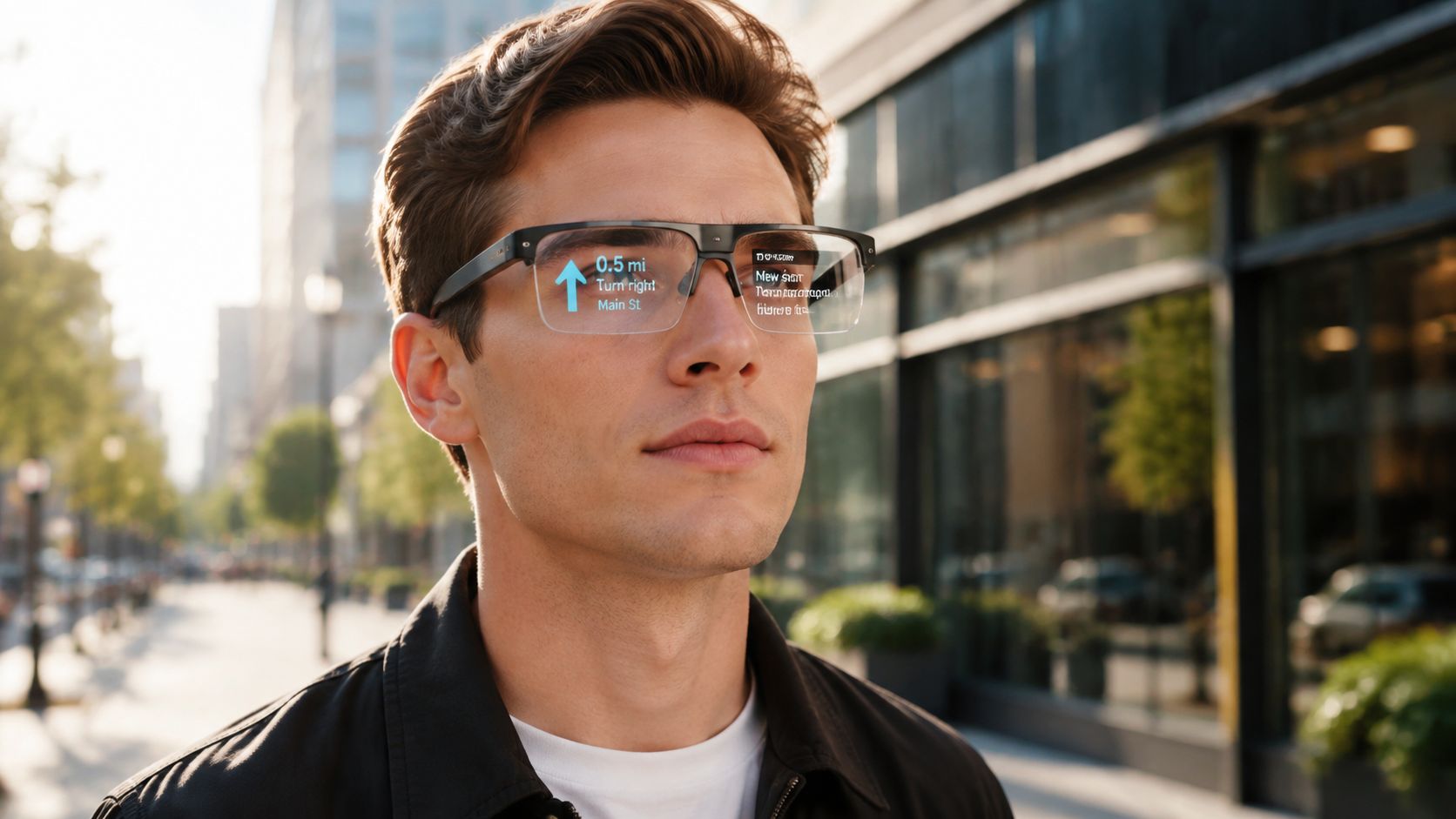
At a café, the wearer asks an AI assistant for a short summary of a message and uses a camera to capture a whiteboard before leaving. A display model could provide captions or a brief meeting prompt where supported, but noisy surroundings can affect speech recognition, and cloud-based features depend on connectivity. Smart glasses work best for short interactions, not long documents or complex app workflows.
During errands, the glasses can capture a product for later, read or interpret a label where supported, and help find a recipe substitution through voice. The interaction feels useful when it takes a few seconds. It feels clumsy when the wearer has to repeat a command, open the phone, adjust the frame, or explain the device to someone nearby.
By evening, music and route logging accompany a run or walk. Then the battery warning appears at 12%, turning an accessory into a device-management task. Battery architecture remains a major constraint: a review of Ray-Ban Meta smart glasses notes that models may advertise up to 36 hours with a charging case, while the glasses themselves can provide about 3 hours of active use and reach 50% charge in around 20 minutes.
The day produced three genuine wins:
- Hands-free communication: The wearer answered a call without searching for a phone.
- Fast capture: The whiteboard and product were saved before the moment disappeared.
- Low-friction audio: The commute stayed connected without sealing off the ears.
It also exposed two awkward moments:
- Social uncertainty: People nearby noticed the camera and wanted reassurance.
- Power anxiety: Heavy AI, camera, and display use shortened the useful window.
Key Features That Matter for Daily Wear
A feature can look impressive in a demonstration and still fail during a full day. Battery behavior, fit, and control speed decide whether smart glasses stay on your face or end up in a drawer. A sharp indoor display is less useful if sunlight washes it out, and an excellent camera cannot compensate for a frame that becomes uncomfortable after an hour.
The daily-wear priority order
Battery comes first. Judge runtime by your routine, not the most favorable claim. Audio, calls, camera recording, AI requests, and displays all draw power differently. A long commute followed by work and evening errands may require the charging case before the day ends. Mainstream smart-glasses coverage continues to flag recharging every few hours as a normal ownership concern, as noted in current smart-glasses coverage. Treat the case as part of the product, not an optional extra.
Fit comes next. Weight distribution matters more than a single weight figure. Nose pressure, temple grip, hinge bulk, lens thickness, and prescription hardware shape comfort over several hours. A pair that feels fine in a shop can pinch during a commute or slide while you work. Check whether the frame stays stable when you look down, walk quickly, or remove a jacket.
Audio and calls determine daily usefulness. Open-ear speakers should remain clear at walking volume without making nearby people hear every word. Microphones need to handle ordinary speech, wind, and background noise. A natural call is more useful than exaggerated bass, especially during errands or a short work break.
Camera quality should serve quick capture. Check the shutter control, recording indicator, transfer speed, and privacy options. The wearer should know when capture is active and respect consent in homes, workplaces, and public settings. A camera is a convenience feature, not permission to record every environment.
AI responsiveness depends on the whole system. Voice recognition, phone connection, network quality, app permissions, and cloud processing all affect the result. AI glasses suit short definitions, simple questions, summaries, and context about something in view. They remain a poor choice for detailed research, long documents, or deliberate writing, where the phone or computer is faster.
Prescription compatibility deserves an early check. Confirm lens availability and whether the chosen frame supports the required prescription before buying. Captions and voice interaction can also matter for accessibility, but smart glasses are not medical devices. Buyers comparing them with health monitoring devices should keep the categories separate. Smart glasses focus on interaction and access, not medical diagnosis.
| Feature | Why It Matters | Target Spec | Real-World Priority |
|---|---|---|---|
| Battery | Prevents charging breaks during normal routines | Match runtime to calls, audio, camera, and AI use | Highest |
| Fit and comfort | Determines whether the glasses stay on the face | Balanced frame, secure temples, suitable lens option | Highest |
| Audio and calls | Supports communication without blocking the ears | Clear open-ear sound and reliable microphones | High |
| Camera | Enables quick, hands-free capture | Easy control, visible recording signal, useful transfer flow | High |
| AI assistant | Reduces phone checks for short tasks | Fast responses with dependable app and network support | Medium to high |
| Prescription support | Makes the device wearable for more buyers | Confirm lenses or inserts before purchase | High |
| Controls | Keeps everyday actions simple | Voice, physical button, or responsive touch control | Medium |
Controls deserve the final check. Voice commands suit quick actions, while a physical button helps when speech is awkward or the phone connection is unreliable. Choose the control method you can use without stopping your commute, interrupting work, or drawing unnecessary attention.
Honest Pros and Cons to Weigh Before Buying
A pair of smart glasses can be useful across a normal day. During a commute, they can handle a call while your hands stay free. At work, they can provide audio or a quick voice response without making you reach for your phone. On errands, a camera can capture a moment quickly. By evening, the same glasses may need charging, feel less comfortable, or raise privacy questions around other people.
What daily owners gain
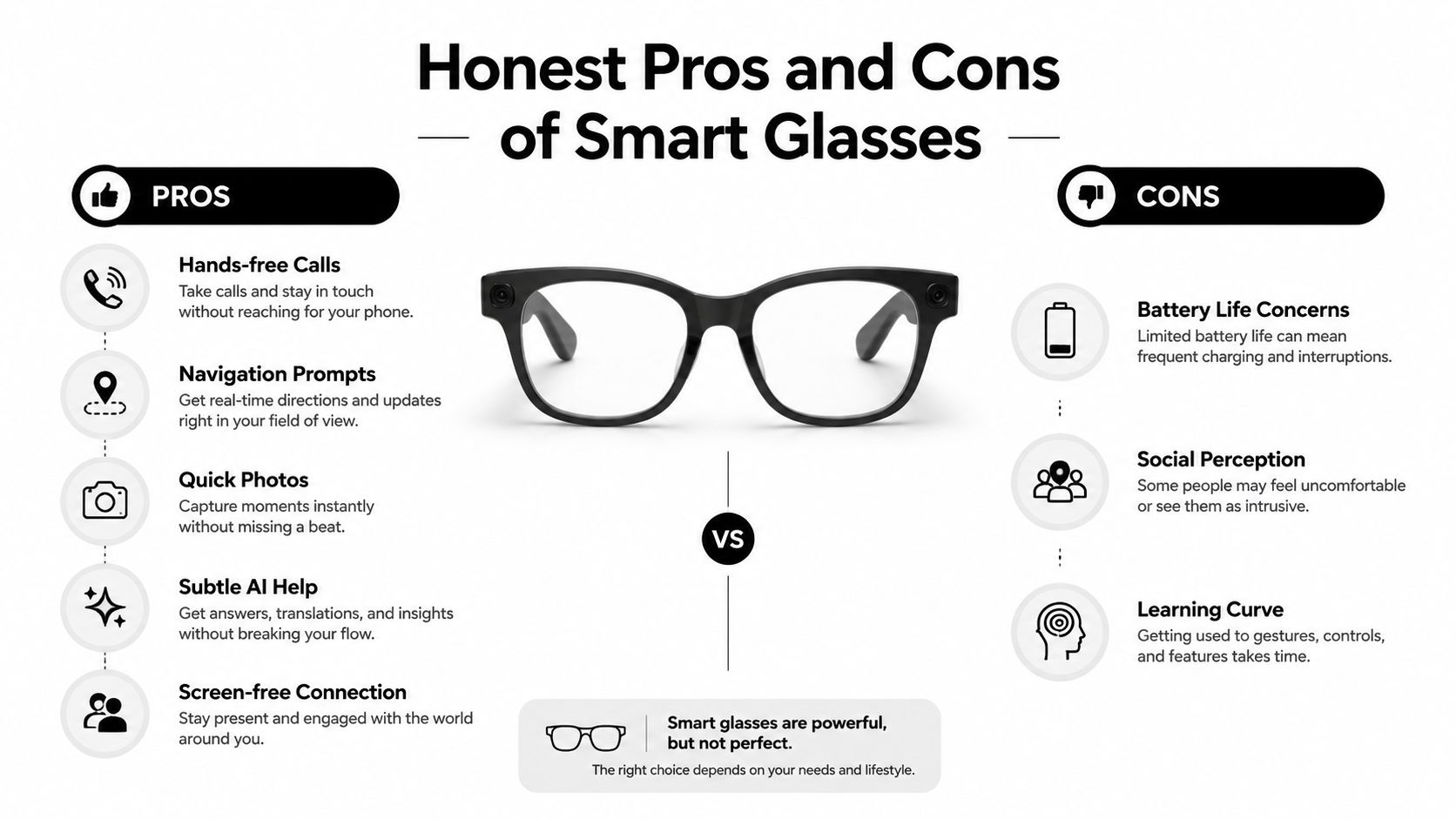
- Hands-free calls: Answer, speak, and keep walking without holding a phone.
- Open-ear awareness: Audio-first frames leave your ears available for announcements and conversation.
- Quick capture: Camera models save photos and short clips from your viewpoint.
- Subtle assistance: Voice AI can handle short questions, reminders, and contextual prompts.
- Screen-free connection: Stay informed without repeatedly pulling out your phone.
These advantages show up during commuting, shopping, walking, caregiving, cooking, and other tasks that keep your hands occupied. They matter less when you need a large display, detailed typing, or extended interaction. For a gift-friendly catalog such as Granted Solutions, that distinction helps keep the recommendation practical. Choose glasses for convenient daily moments, not for every phone task.
What the buyer gives up
Battery life is the clearest compromise. A charging case improves portability, but it also becomes another object to carry and another habit to remember. Active camera, audio, and assistant use can shorten the day considerably, so buyers should judge runtime against their own routine rather than the case-supported figure advertised for the product.
Privacy creates a social cost. Camera and microphone hardware may make colleagues, restaurant guests, or strangers wonder what the device is doing. A visible recording indicator helps people understand when capture is active, but it does not replace consent. Audio-only glasses remove the camera concern, although open-ear sound can still feel unusual in a quiet setting.
Display models add capability while bringing more attention and a learning curve. See-through displays suit glanceable information, not the broad workspace of a phone or laptop. Weather resistance, prescription availability, app quality, and phone compatibility can narrow the choice further. Buyers focused on screen comfort should keep that question separate from smart features and read this guide to blue-light glasses effectiveness.
The honest trade-off: Smart glasses reduce phone friction, but they still require charging, maintenance, privacy awareness, and good etiquette.
Setup and Care Tips for the First Week
A new pair should earn trust gradually. The first week is less about activating every feature and more about finding a comfortable routine that doesn't turn the glasses into a nuisance.
A seven-day start
- Day one, pair the basics. Unbox the glasses, install the companion app, pair them with the phone, and test calls, audio, camera controls, and charging. Check which permissions the app requests before enabling notifications, microphone access, camera access, or cloud sync.
- Day two, adjust the fit. Wear the glasses for a short walk and note pressure around the nose and temples. If the model includes alternate nose pads or adjustable elements, make one change at a time.
- Day three, test long comfort. Use the glasses during a normal work session, then check whether prescription lenses, hair, hats, or earbuds interfere with the frame. Comfort problems usually appear through pressure and slipping, not through the spec sheet.
- Day four, establish charging habits. Keep the case in the place where the glasses are normally removed. A top-up before commuting may be more practical than waiting for a full cycle, but camera, AI, and display use should be tested against the actual day rather than assumed runtime.
- Day five, clean carefully. Use a clean microfiber cloth for lenses and frame surfaces. Avoid spraying cleaner directly onto electronics, and store the glasses in their case instead of loose in a bag.
- Day six, review software and privacy. Install firmware updates through the official app, inspect recording indicators, adjust notification access, and disable features that aren't appropriate for work or shared spaces.
- Day seven, rehearse travel. Pack the charging case, a compatible cable, and a backup power option if needed. Check airplane-mode behavior and follow airline and customs rules for rechargeable electronics.
The best setup is boring: the glasses should pair reliably, fit securely, and perform the two or three tasks that matter without constant adjustment.
How to Choose the Right Pair for Your Routine
The right smart glasses are chosen by routine, not by the longest feature list. A buyer who mainly takes calls on a commute shouldn't pay for a display they'll rarely use. A creator who wants first-person capture needs a camera, while a worker who needs captions or prompts may prefer display-focused eyewear with a stronger privacy posture.
Start with a lifestyle audit
Write down the moments when a phone feels inconvenient:
- Commute: Calls, music, announcements, and walking directions point toward audio-first glasses.
- Work: Captions, brief prompts, and discreet notifications may favor a display model, subject to workplace rules.
- Errands: Voice assistance and quick product or label capture make camera-and-AI glasses useful.
- Family time: A camera can capture hands-free memories, but consent and venue expectations remain essential.
- Outdoor activity: Open-ear audio can support music and route cues, provided the wearer stays attentive to surroundings.
Match the category before the brand
Audio-first models are the safest recommendation for most first-time buyers. They offer the clearest everyday benefit with fewer privacy objections and a simpler interaction model. They're a natural upgrade for someone who already likes wireless earbuds but wants less ear coverage.
Camera-enabled models suit memory-keepers and creators. The purchase makes sense only when the wearer accepts responsibility for visible recording signals, permission, and venue restrictions.
Display or AR models are for people who need glanceable navigation, captions, translations, or prompts. Buyers should inspect field of view, outdoor brightness, prescription support, and the amount of phone or cloud dependence before choosing one.
Prescription compatibility can eliminate an otherwise appealing model. So can ecosystem mismatch. A pair that works smoothly with one phone platform may offer a less polished experience with another, especially when notifications, voice assistants, and companion apps are central to daily use.
Social context deserves equal weight. A subtle, no-camera frame is more likely to fit an office, transit system, or restaurant than a visibly camera-equipped design. For gifts, the recipient's lens needs, phone ecosystem, and comfort preferences should be confirmed before purchase. Smart glasses are personal eyewear, not a universal gadget.
Bringing Smart Glasses Into Your Everyday Setup
Smart glasses succeed when they remove friction. A call gets answered without a phone search, a route prompt appears during a walk, or a family moment is captured while both hands stay available. Those small wins can justify the device more convincingly than a dramatic AR demo.
The trade-offs remain visible. Battery routines matter, especially with camera, AI, or display use. Privacy perception can shape where the glasses feel welcome, and the companion app may require permissions, updates, and a reliable phone connection. A display can add useful captions or directions, but its glanceable format isn't a replacement for a laptop or phone.
The strongest buying decision starts with one question: what repeated daily interruption should the glasses remove? That answer points toward audio-first, camera-centric, or display-focused eyewear. Buyers should also confirm prescription support, comfort, charging behavior, controls, and return terms before committing.
A practical accessory setup can make the transition smoother. A reliable charging location, microfiber cloth, protective case, and compatible cable matter as much as the frame's smart features. For people who take frequent remote calls, better lighting for video calls can improve the surrounding setup without asking smart glasses to solve every communication problem.
Granted Solutions curates practical gadgets and everyday accessories designed to make modern routines easier, including gift-friendly technology for commuters, creators, families, and busy professionals. Visit Granted Solutions to explore useful picks that balance convenience, comfort, and everyday value.
Leave a comment