

Smart Home Security Systems: Your 2026 Buying Guide

Home security isn't always top of mind until a small worry turns into a big one. A door gets left open, a package sits on the porch after dark, or a strange sound from the garage makes the whole house feel unsettled. Smart home security systems are built for that exact kind of everyday anxiety, because they turn “I hope everything's fine” into visible, checkable reassurance.
The category isn't niche anymore. The global smart home security market is projected to grow from USD 33.94 billion in 2024 to USD 82.07 billion by 2030, with North America accounting for 35.70% of revenue in 2025 Grand View Research. That kind of scale says something simple, households aren't treating this as a gadget experiment anymore, they're treating it like a practical part of modern living.
Table of Contents
- More Than an Alarm The New Peace of Mind
- The Building Blocks of a Smart Security System
- Choosing Your Path DIY vs Professional Systems
- Getting It Right Installation and Compatibility
- Protecting Your Privacy in a Connected Home
- Your Smart Security Buying Checklist
- Keeping Your System Healthy and Answering Your Questions
More Than an Alarm The New Peace of Mind
A family can head out for dinner and still know the back door is latched. Someone can hear a bump upstairs and check a phone from the couch instead of walking into a dark hallway. That is the primary appeal of smart home security systems. They do more than sound an alarm, they make everyday life feel easier to manage.
That peace of mind shows up in small routines. A delivery alert can tell you a package arrived before rain or porch thieves become a worry. A quick camera check can confirm whether the dog is barking at the mail carrier or whether the cat knocked something off a shelf. A motion alert from the right indoor sensor setup can also help you tell the difference between normal movement and something that needs attention, which saves you from reacting to every little sound.
A good system helps with those in-between moments that cause stress. You can verify the front door, see who is outside, or check a room before sending a child upstairs. For shoppers comparing practical problem-solving products, that is the value to look for, technology that reduces worry, fits into the day without friction, and keeps the home feeling covered in the background.
The Building Blocks of a Smart Security System
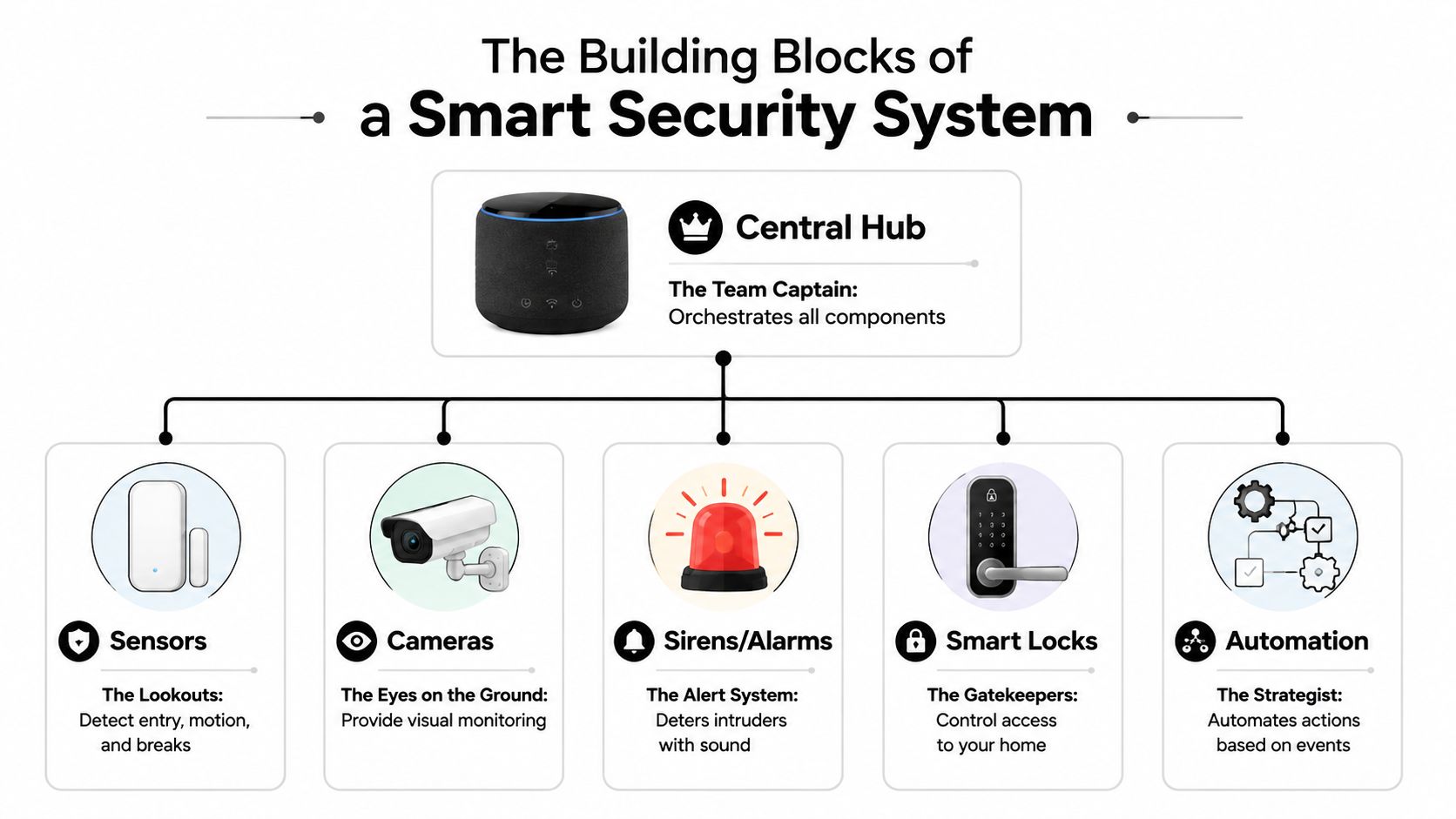
A smart security setup feels easier to trust when every part has a clear job. The hub keeps the system coordinated, the sensors watch doors and windows, the motion detectors cover rooms and hallways, and the cameras give you a visual check when an alert comes through. That layered approach matters because no single device should be expected to cover every weak spot in the home.
What the hub does
The hub is the system's control point. It connects the devices, sends alerts, and keeps the system talking even when your phone is not nearby. A good hub also needs backup power, because a security system that goes quiet during an outage leaves a gap exactly when you want coverage most.
Consumer Reports explains that base stations often serve as the wireless hub and internet bridge, and that they may include backup batteries and backup cellular connectivity to keep the system running during outages Consumer Reports. That matters in real life. If the lights go out, the system should still be able to do its job.
Practical rule: put the strongest budget toward the hub and perimeter sensors first, then add room-level motion detection where it helps most.
Contact sensors belong on doors and windows. They are the first line of notice when an entry point opens. Motion sensors belong in rooms or hallways where movement should trigger attention, and cameras provide the visual layer that helps you confirm what happened after the system spots activity. A camera alone can look reassuring, but it can still miss the early warning that a sensor would have caught.
Why layers matter
A layered system reduces the risk of depending on one device type for everything. If a door sensor misses an opening, a motion detector may still catch movement inside. If a camera does not clearly show what happened, the hub and sensors have already handled the alert path.
That is why careful placement matters so much. A well-chosen set of entry sensors, hallway coverage, and room-level detection gives you a fuller picture of the home without making the setup hard to live with. For a practical example of room-level coverage, the guide to best motion sensors is a useful place to start.
The most reliable systems do not feel busy during the day. They feel calm, the app opens cleanly, the status makes sense at a glance, and the house stays covered from the first point of entry to the living spaces.
Choosing Your Path DIY vs Professional Systems
The biggest purchase decision usually isn't the brand, it's the setup style. Some households want a kit they can mount over a weekend. Others want a trained installer and ongoing monitoring handled by someone else. Both routes are valid, and the market has enough maturity to support them, since 48% of U.S. households already owned at least one smart home security device in 2023, and 60% of households with a smart home had a security device WorldMetrics.
DIY and professional options compared
| Feature | DIY Systems | Professional Systems |
|---|---|---|
| Installation | Self-installed, usually more hands-on | Installed by a professional |
| Upfront cost | Often lower at the start | Often higher at the start |
| Ongoing support | Depends on the brand and app | Typically includes expert setup and support |
| Monitoring | Often self-monitoring or optional monitoring | Usually built around professional monitoring |
| Flexibility | Easy to expand or move pieces around | More structured, less flexible for tinkering |
A DIY system fits a homeowner who likes control. That person usually wants to place sensors, name devices, and manage alerts without scheduling appointments. A professional system fits a busy household that values convenience and doesn't want to troubleshoot installation details.
The smarter question isn't “Which is better?” It's “Which one matches daily life?” A renter with a few entry points may want a kit that's easy to move. A larger home with more doors, windows, and routines may benefit from a service-heavy option with less setup work.
A good buyer doesn't choose DIY because it's cheaper, or professional because it sounds safer. The right choice is the one that will actually get installed, get used, and stay maintained.
Getting It Right Installation and Compatibility
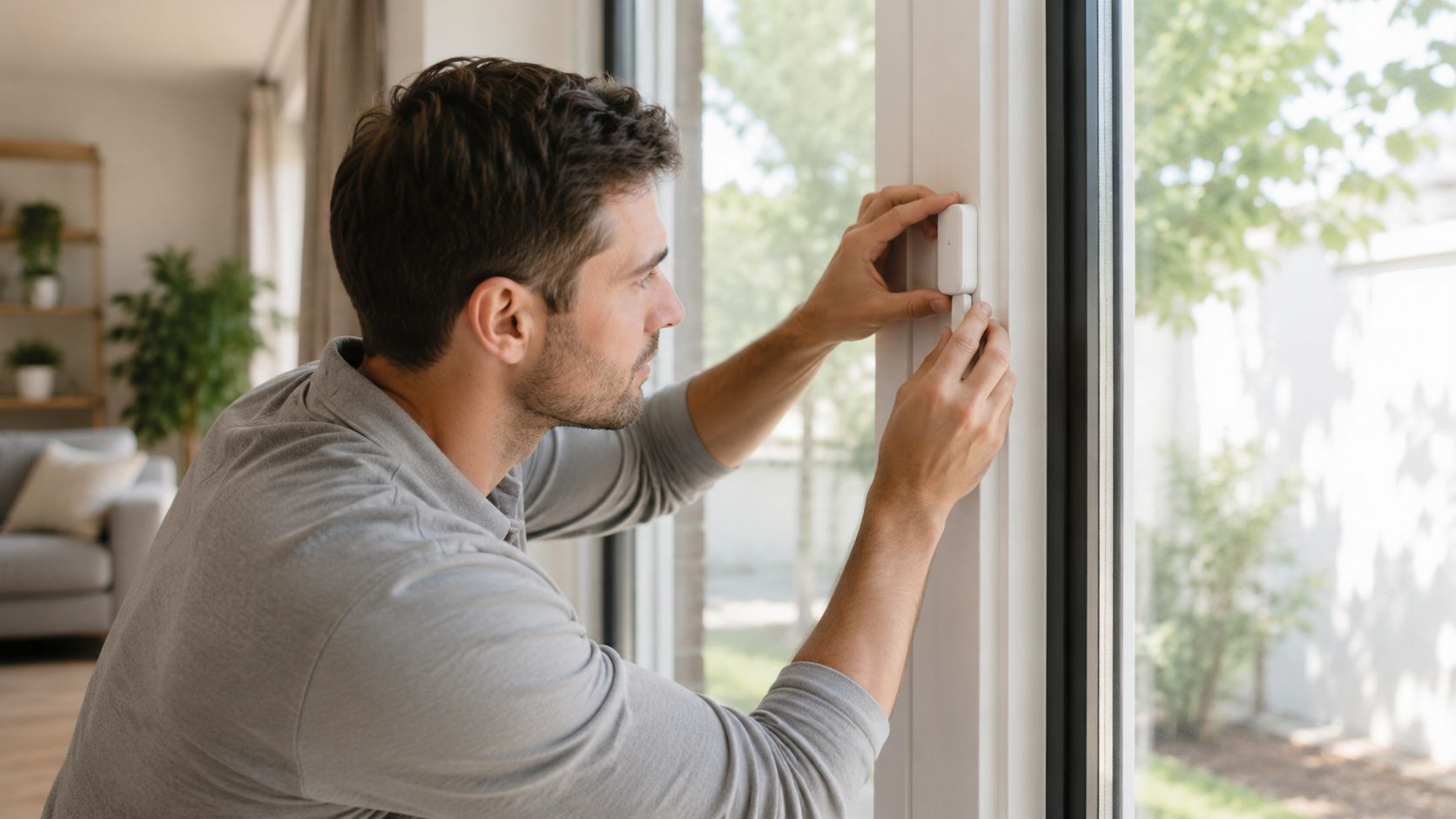
A lot of security disappointment starts with placement, not product quality. Security researchers note that weaknesses often show up in overlooked areas like garage doors and in poor device maintenance, while a 2023 survey tied many smart-home flaws to unclear responsibility boundaries and a lack of clear security standards MEXC News. That makes installation discipline just as important as the spec sheet.
The three mistakes that cause the most trouble
First, don't skip vulnerable entry points. Garage doors, side entries, and back doors are easy to overlook because they're used casually, but those are exactly the spots that deserve sensors and good visibility.
Second, don't assume the Wi-Fi network will cover everything evenly. A camera that drops offline or a hub that sits too far from a router can create gaps that don't show up until something goes wrong.
Third, don't buy devices that don't fit the rest of the home. Compatibility matters when a household already uses voice assistants or other connected gear, because an isolated device can feel like one more app to manage instead of part of a usable system.
For practical setup guidance on locks, there's a helpful internal guide on smart door lock installation. That kind of step-by-step thinking is useful because a well-mounted device can do its job, while a poorly mounted one may look fine and still fail in practice.
Simple placement rules
- Cover the perimeter first: Put sensors where a person would realistically enter.
- Avoid dead zones: Check whether cameras or motion detectors see the area they're meant to watch.
- Test after installation: Open, close, walk, and trigger every device before trusting it.
The best installs feel boring. That's a compliment. When sensors are mounted correctly, the app connects cleanly, and the system responds without delay, the homeowner stops thinking about the hardware and starts trusting the result.
Protecting Your Privacy in a Connected Home
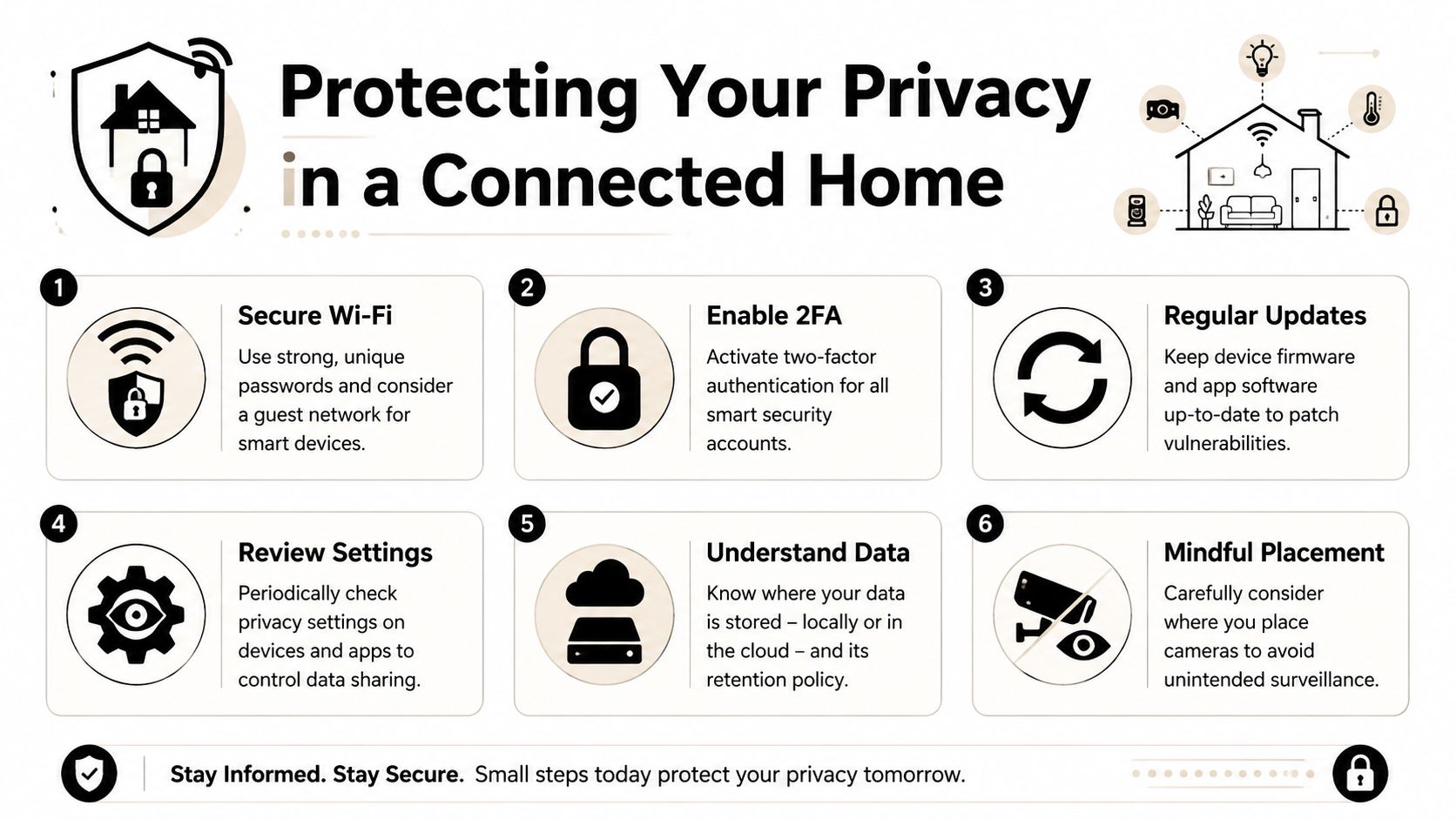
A front-door camera can bring peace of mind, but it also joins the home network, so privacy deserves the same care as burglary protection. Smart-home systems can face a wide range of cyberattacks, as noted in the National Library of Medicine review. The goal is not alarm. It is simple, repeatable habits that keep the system harder to misuse.
The habits that matter most
Start with strong, unique passwords for each device and account. The same review also points to segregating the network, whitelisting devices on a firewall, and applying the latest security updates as core defenses. In practical terms, those steps keep one device from becoming an open side door into everything else in the house.
Camera placement matters just as much as login security. A camera should help the household see the front porch, driveway, or entry path, while avoiding private spaces that do not need monitoring. That matters in shared homes, nurseries, and other rooms where visibility is useful but constant watching would feel intrusive.
Families also face a second question, what a monitoring device records and who can access it. The same concern comes up with baby monitors that record, because the right choice balances usefulness with clear boundaries. A good system should give the home better awareness without creating a sense that every moment is being watched.
A straightforward privacy checklist
- Secure Wi-Fi: Keep passwords strong and unique.
- Enable 2FA: Turn on two-factor authentication wherever it is available.
- Update regularly: Install firmware and app updates promptly.
- Review privacy settings: Check what gets stored and shared.
- Know the data path: Understand whether footage stays local or goes to the cloud.
- Place cameras carefully: Aim only where the household requires coverage.
That approach keeps smart security useful without making it feel invasive. A well-configured system gives peace of mind because the homeowner knows who can see the data and what the devices are doing.
Your Smart Security Buying Checklist
The easiest way to shop is to match the system to the house, not the other way around. A small apartment, a busy family home, and a property with a garage all need different priorities. The right checklist keeps the decision practical.
- Map the entry points: Count doors, windows, garage access, and side entrances first.
- Decide on the main goal: Choose between intrusion alerts, visual monitoring, or both.
- Check for backup behavior: Look for a hub that can keep working during outages.
- Match the install style: Pick DIY if the household wants flexibility, or professional if convenience matters more.
- Think about family routines: Consider pets, kids, deliveries, and people who come and go often.
- Confirm compatibility: Make sure the system fits the rest of the home's smart devices.
- Set a maintenance habit: Choose a system that will be tested, updated, and used.
The best shopping decision is one that effectively addresses the core problem in the home. A porch-heavy house needs better exterior awareness. A family that's away all day may care more about app alerts and video checks. A pet owner may want motion and camera placement that won't turn every hallway movement into a false alarm.
Keeping Your System Healthy and Answering Your Questions
A smart security system stays dependable when it gets regular attention. That sounds simple, and it is. Sensors need testing, camera lenses need cleaning when dust or cobwebs build up, and batteries should be checked before they fade at the worst moment. A few minutes of care can keep a small issue from turning into a missed alert when the house needs protection.
Quick maintenance habits
- Test door and window sensors: Open and close them to confirm alerts still fire.
- Check camera views: Make sure nothing new is blocking the lens.
- Watch battery levels: Replace or recharge power sources before they dip too low.
- Review app alerts: Delete stale permissions and confirm notifications still reach the right phone.
- Update devices: Keep firmware current so the system stays stable and protected.
Common questions from new owners
What happens if the power goes out?
A well-designed system can keep working with backup batteries, and some setups also use cellular failover at the hub. That was one of the reasons the hub mattered earlier, because the hub is what helps the system keep its footing when the home loses normal power.
Do smart security systems help with more than burglary?
Yes. Many households use them to check deliveries, monitor entrances, and keep an eye on daily activity, not just break-ins. That wider use is part of why the category has become so common in real homes, where peace of mind often comes from knowing what is happening at the door, the driveway, or the side gate.
How much internet speed is needed?
That depends on how many cameras and connected devices are active at once. A system that only sends alerts needs less bandwidth than a home that streams video and stores clips in the cloud, so the practical move is to match the internet plan to the amount of video traffic the household will create.
Can the system still work if one device fails?
That is the benefit of the layered setup from earlier. One failed sensor should not leave the whole house exposed if the hub and the other sensors are still active, which is why a good setup is built to fail in pieces instead of all at once.
The best ownership habit is straightforward. Treat the system like any other important household tool, check it, update it, and trust it because it has been maintained, not because it was once installed.
Granted Solutions curates practical gadgets and home essentials that make everyday life easier, and smart security fits that mission perfectly. If a home needs better peace of mind, clearer alerts, or a more confident setup, visit Granted Solutions and browse the smart, problem-solving picks that help turn a worried house into a calmer one.
Leave a comment