

Baby Monitor Low EMF: A Practical Buyer's Guide

A baby monitor can sit in a nursery for hours while parents focus on the part that feels urgent, whether the baby is sleeping, breathing normally, or about to wake. Then the glowing camera, wireless signal, and search results about “radiation-free” products create a second problem: how can a family choose a monitor without sacrificing dependable sound and video?
The sensible answer isn't to panic or trust a label. A good baby monitor low EMF decision comes down to three practical controls: distance from the crib, how often the transmitter is active, and whether the manufacturer provides verifiable specifications. Transmission type matters, but it isn't the whole decision.
Table of Contents
- Why Parents Are Looking for a Low EMF Baby Monitor
- EMF Basics Every Parent Should Understand
- Wired vs Wireless Monitors Side by Side
- How Distance and Duty Cycle Change Real Exposure
- Setting Up Your Nursery for the Lowest Practical Exposure
- Matching Monitor Types to Real Family Situations
- Questions to Ask Before You Buy and Where to Compare
Why Parents Are Looking for a Low EMF Baby Monitor
At 10 p.m., a parent stands in the nursery doorway, watching a small screen glow beside the crib. The camera shows a sleeping baby and the audio is clear. Then a practical question arises: has the camera been transmitting across the room all night, especially if it is mounted near the sleep surface?
That concern is reasonable. A modern nursery may contain a camera, parent unit, Wi-Fi equipment, smart lights, a sound machine, and other connected devices. Product labels such as low EMF, eco mode, and reduced radiation sound reassuring, but they do not identify a universal technical category or guarantee a particular exposure level.
The useful question is specific: How can parents keep a reliable monitor at a sensible distance while limiting unnecessary radio transmission?
The real trade-off
A wired camera can reduce radiofrequency transmission from the camera, but cable routing may be awkward. A wireless video monitor allows mobility and remote viewing, yet it may transmit more often. An audio-only monitor keeps the setup simple, while a smart camera may offer features a family genuinely uses.
I would choose based on the nursery layout first. Then I would weigh remote-access needs, the value of a dedicated parent unit, and how much wireless activity the family is comfortable having in the room. Transmission type matters, but distance, duty cycle, and verifiable specifications give a more useful basis for comparison.
Practical rule: Mount the monitor across the room and configure it to transmit only when needed. That is usually a better choice than placing a product marketed as lower-emission directly beside the crib.
A monitor's category does not settle the question. For a wired setup, check where the power cable and any connected equipment will sit. For a wireless or smart setup, look for voice- or motion-activated transmission, standby behavior, frequency information, transmitter details, and placement instructions. The same checks make comparisons across Granted Solutions categories more meaningful than relying on a label.
The United States regulatory baseline provides context. The FCC adopted its modern RF exposure framework on August 1, 1996, covering transmitters operating from 300 kHz to 100 GHz and including SAR requirements for devices used close to the body. The public-exposure SAR limit for applicable portable wireless devices is 1.6 W/kg, averaged over 1 gram of tissue, and the whole-body limit is 0.08 W/kg. The portable and mobile device limits became effective on August 7, 1996. The FCC's RF safety overview explains the framework and its limits.
That framework does not make “low EMF” a regulated product category. It gives shoppers a way to ask better questions. If a product page provides only a reassuring slogan, it is not useful enough for a careful comparison.
EMF Basics Every Parent Should Understand
A monitor's “low EMF” label tells you very little on its own. To assess a product properly, read the specification sheet for specific absorption rate, or SAR, power density or field strength, transmitter behavior, and placement instructions.
SAR measures absorbed energy
SAR describes how quickly radiofrequency energy is absorbed by tissue. It is expressed in watts per kilogram and matters most when a transmitting device operates close to the body, such as a phone or body-worn transmitter.
The FCC public-exposure limit for applicable portable devices is 1.6 W/kg averaged over 1 gram of tissue, while the whole-body public-exposure limit is 0.08 W/kg. These are regulatory exposure limits, not measurements of the output from every baby monitor in a nursery. The FCC framework explains why test conditions, averaging methods, and the device's intended position matter.
A filed baby-monitor manual shows why model-specific documents deserve attention. One model reported a maximum parent-unit SAR of 0.043 W/kg near the face and 0.125 W/kg when body-worn. Its instructions also required the camera to remain at least 20 cm from people. Those figures apply to that model and its tested positions, not to every monitor. The model-specific FCC filing gives shoppers tested figures and separation instructions instead of a retailer's vague “safe radiation” wording.
Use SAR data to understand close-contact testing. Do not use it as a complete description of a camera's nursery exposure.
Power density describes the surrounding field
A camera on a dresser usually does not press against anyone's body. For that setup, power density or field strength can provide more useful context than a phone-style SAR comparison. These measurements describe energy in the surrounding space rather than absorption during a particular body-contact test.
Distance changes the situation quickly. A camera mounted across the room is not equivalent to one attached to a crib rail, even if both use the same wireless protocol. A transmitter beside a baby's head also operates in a different placement scenario from one fixed to a distant wall.
The National Center for Biotechnology Information reference on RF exposure distinguishes absorbed energy from field-strength and power-density measurements used for transmitting equipment and other exposure situations. It also identifies the 30 to 300 MHz range as receiving particularly restrictive treatment because of resonance considerations involving people, including children.
Duty cycle is the missing specification
Duty cycle is the portion of time a radio actively transmits. A camera that sends live video continuously has a different operating pattern from an audio monitor that wakes when sound crosses a threshold.
Peak output shows only one part of the picture. A short burst and a continuous stream can create different practical exposure patterns, even when a meter records a similar maximum. Check whether “VOX” or “sound activation” stops the camera's transmission, or only switches off the parent-unit display.
Choose a monitor with modest output, a low unnecessary duty cycle, and generous distance. Transmission type matters, but these three controls provide a better basis for comparing nursery setups and Granted Solutions categories.
Wired vs Wireless Monitors Side by Side
A wired camera is the clearest low-EMF architecture because the camera doesn't need to transmit radiofrequency energy when audio and video travel through a cable. Its drawbacks are practical: the cable must reach the display or network, the camera is less portable, and installation requires careful cord management.
Wireless monitors divide into several broad approaches. FHSS systems use frequency-hopping radio links, DECT systems use a dedicated digital audio connection, and Wi-Fi or IP cameras send data through a home network or internet-connected service. Their actual exposure depends on antenna design, transmitter power, transmission schedule, and placement, not just the name printed on the package.
| Architecture | RF Output | Duty Cycle | Typical Range | Best Placement | Trade-off |
|---|---|---|---|---|---|
| Wired camera | No camera RF transmission when the signal travels by cable | Dependent on the connected display or network equipment | Limited by cable or network installation | Camera across the room, with cables secured away from the sleep area | Lowest practical camera transmission, least flexible installation |
| FHSS wireless | Short radio transmissions between camera and parent unit | May be intermittent or activity-dependent, depending on the model | Suitable for room-to-room use when the signal is stable | Camera on a distant dresser or wall, not on the crib | Dedicated connection, but fewer app-based features |
| DECT audio | Digital radio link between the nursery and parent unit | May remain active for dependable audio, depending on the design | Often suitable for ordinary home layouts | Nursery unit away from the crib and parent unit away from the bed | Reliable audio, but potentially more continuous transmission |
| Wi-Fi or IP camera | Wireless network transmission for audio and video | Can be sustained during live viewing or reduced by sleep and alert modes | Depends on home network coverage | Camera positioned away from the crib, with the router kept away from the sleep space | Flexible remote access, but greater dependence on the network and app |
The table is a decision aid, not a ranking. A wired setup makes the strongest case for minimizing camera RF transmission, but it may be impractical in a rental or a room where the display needs to move. A Wi-Fi camera may have a well-designed antenna and a useful standby mode, while a lower-priced non-Wi-Fi monitor may transmit more frequently.
A family comparing models should read the manual rather than assume that “no Wi-Fi” means “no RF.” Any wireless audio or video connection uses radiofrequency energy. The guide to baby monitors without Wi-Fi can help families evaluate the closed-system trade-off without treating the protocol name as a safety verdict.
The protocol label describes how the monitor connects. It doesn't, by itself, describe how much energy the device transmits or where that energy goes.
The honest verdict is simple. Wired works best for families willing to trade convenience for the most direct reduction in camera radio transmission. Wireless works well when the camera stays distant and the family uses standby or voice activation properly.
How Distance and Duty Cycle Change Real Exposure
Proximity often matters more than the logo on the monitor. A device placed immediately beside a crib creates a more concentrated exposure scenario than the same device positioned across the room, even when both use identical transmission technology.
A review summarized by the National Collaborating Centre for Environmental Health reported power density at 3.3% of the ICNIRP reference level at 30 cm, falling to 0.3% at 1 m. The figures illustrate the effect of moving a transmitter farther away, although they shouldn't be treated as a universal reading for every baby monitor. The review summary on RF exposure and health also distinguishes practical precautions from claims that ordinary compliant devices cause acute health effects.
Why placement beats protocol arguments
The inverse-square relationship provides a useful intuition. As separation increases, power density falls sharply. The exact result depends on the antenna, room reflections, transmission frequency, and measurement method, but moving the camera away from the baby's head is a reliable practical control.
That is why a camera attached to a crib rail is a poor setup, even if its packaging uses low-emission language. A camera on a dresser across the room may offer a better overall balance of image quality, viewing angle, cord safety, and reduced proximity.
Duty cycle changes cumulative exposure
A live Wi-Fi video stream can keep the camera active while a parent watches. A DECT audio monitor may maintain a dedicated connection for reliable sound. An FHSS model may send shorter bursts, while a VOX-enabled unit may transmit only when the nursery becomes active.
The feature name isn't enough. Some products place the camera into a low-power state. Others only switch off the parent-unit screen while the camera continues transmitting. The manual should state what happens in each mode.
Parents should look for:
- Actual voice activation: The camera or transmitter should reduce radio activity, not merely darken the display.
- Adjustable range or power: The lowest usable setting is preferable to a maximum-range mode in a small home.
- Audio-only operation: This can reduce the need for continuous video transmission when a picture isn't needed.
- Automatic standby: The system should explain whether standby affects the camera, the parent unit, or both.
- Clear placement guidance: The manufacturer should identify a minimum separation distance.
The strongest setup combines distance with a lower duty cycle. Choosing one without the other leaves an obvious control unused.
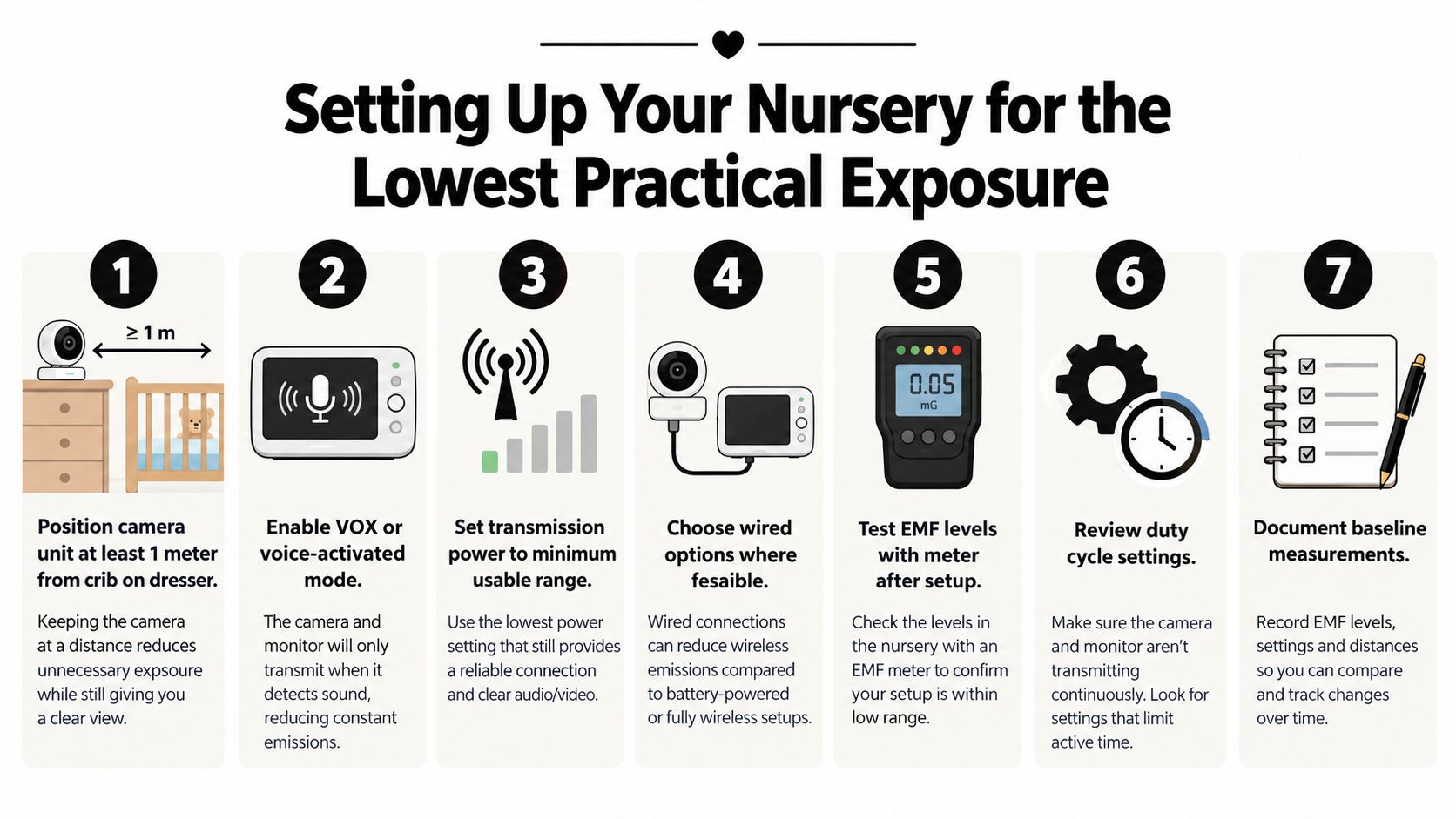
Setting Up Your Nursery for the Lowest Practical Exposure
A low-EMF nursery setup doesn't require a complicated project. Parents can make the most useful changes during the same evening they unpack the monitor.
Start with the camera position
Place the camera at least 1 m from the cot, preferably on a stable dresser or a wall mount across the room. Swiss public-health guidance recommends this distance and also advises keeping the power adapter at least 50 cm from the cot. The Swiss government baby-monitor fact sheet provides the placement guidance and explains why SAR comparisons must account for different measurement methods.
Never place the camera on the crib rail, inside a bassinet, or where a cord can enter the sleep area. Safe installation comes first. A camera that provides a perfect angle but creates a cord or mounting hazard isn't a good nursery solution.
The parent unit deserves distance too. A portable screen parked on a nightstand at pillow level can sit close to an adult for hours. Moving it across the bedroom, using audio alerts, or relying on a remote display can reduce unnecessary proximity.
Change the operating settings
The following routine keeps the system useful without leaving every feature active:
- Enable VOX or sound activation. Confirm that the camera reduces transmission rather than only turning off the screen.
- Use the minimum practical transmission range. A small nursery doesn't need a setting designed for a large house.
- Turn off unnecessary lights. Disable bright status LEDs when the product allows it.
- Switch off decorative features. Lullabies, night-light projectors, and background audio aren't essential to monitoring.
- Use audio-only mode when appropriate. Video is valuable for some checks, but it isn't necessary for every nap.
- Power down the system during long periods when nobody is listening. This removes transmission rather than leaving the monitor idle.
- Use wired networking where the product supports it. Hardwiring a display or network connection can reduce wireless links in part of the system, but parents should check what the camera still transmits.

The logo matters less than these habits. A well-placed monitor with a sensible duty cycle is a stronger practical choice than a product marketed as low EMF but installed inches from the crib.
Matching Monitor Types to Real Family Situations
Different families need different compromises. Declaring one architecture the universal winner ignores the way monitors are used.
| Family Situation | Best-Fit Monitor Type | Why It Works | Alternative If Opposite Priority |
|---|---|---|---|
| First-time parents seeking the lowest practical field near the sleep area | Wired audio or video, or a wireless unit placed at least 1 m away with VOX enabled | It prioritizes distance, reduced transmission, and a simple operating routine | A Wi-Fi camera if remote viewing matters more than a closed local connection |
| Apartment renters dealing with crowded wireless networks | Dedicated audio monitor, such as a DECT design, placed away from the cot | It avoids dependence on the home's Wi-Fi network and can provide predictable local audio | A wired setup if installation is possible and RF minimization is the main priority |
| Grandparents and frequent travelers who need fast setup | Wi-Fi monitor with a clearly documented sleep or night mode | App access and quick installation can outweigh the inconvenience of carrying a separate parent unit | A compact audio monitor if network reliability and privacy matter more |
| Families who want video only during checks | Monitor with audio-only or standby behavior | It avoids continuous viewing when sound alerts are sufficient | A continuously available video feed when visual reassurance is essential |
The first-time parent
A parent who wants the lowest practical field near the crib should begin with placement, not protocol. A wired camera or audio system is the most direct option, but a wireless model can also fit the brief if it stays distant and uses voice activation correctly.
The opposite priority is a rich video experience. In that case, a Wi-Fi camera may be acceptable if the family verifies sleep behavior, keeps the camera away from the crib, and doesn't confuse a low-emission claim with a medical guarantee.
The apartment renter
Dense apartment buildings can make wireless reliability frustrating. A dedicated audio connection may be preferable because it doesn't depend on the household Wi-Fi network. The trade-off is that an always-active link can have a higher duty cycle than a sound-activated design.
Families choosing this route should place the nursery unit away from the cot and accept that reliable audio may matter more than app access. A wired monitor is the alternative for a renter who can route cables safely and doesn't need portability.
The traveler or grandparent
Travel favors convenience. A Wi-Fi monitor can be quicker to set up in a temporary room, especially when relatives already use the same app ecosystem. The camera still belongs on a stable surface away from the sleep area, not on a portable arm attached to the crib.
Families comparing recording and remote-viewing features can use this guide to baby monitors that record to separate useful documentation from features that only keep a camera transmitting longer.
Questions to Ask Before You Buy and Where to Compare
A shopper should be skeptical of any product that says “low radiation” without showing what the phrase means. Eco mode may reduce transmission, or it may only dim the display. Safe for baby is a marketing statement, not a substitute for a test report. No Wi-Fi means the monitor uses another transmission method, not that it emits nothing.
The specification checklist
Before buying, parents should ask the retailer or manufacturer for:
- SAR or tested RF information: A U.S.-market wireless device should have identifiable compliance documentation. The applicable FCC portable-device SAR limit is 1.6 W/kg averaged over 1 gram, but the product's own tested value and position matter.
- Operating frequency: The listing should identify the relevant frequency band or bands.
- Transmission behavior: The manufacturer should say whether the camera transmits continuously, in bursts, or only after sound or motion.
- VOX performance: The manual should clarify whether the feature disables or reduces camera transmission.
- Minimum separation distance: Placement instructions should be explicit, not buried in an image or omitted entirely.
- Test conditions: A meter reading means little without the distance, orientation, operating mode, and measurement method.
- Independent testing: Laboratory results are more useful when they explain the setup and distinguish peak readings from time-averaged results.
- FCC identification: For U.S. products, an FCC ID can help shoppers locate filings and manuals instead of relying only on retailer copy.
The research literature makes the comparison problem clear. A review examined nine commercially available baby monitors operating from 400 MHz to 2.45 GHz and evaluated electric-field exposure and SAR against ICNIRP limits. Results from consumer meters still need context because distance, antenna orientation, duty cycle, and operating state can change the reading. The available review supports demanding a repeatable method rather than accepting an isolated number.
What the health guidance says
The International Commission on Non-Ionizing Radiation Protection's 2020 RF guidelines cover 100 kHz through 300 GHz, including technologies used by Wi-Fi, Bluetooth, phones, and other wireless transmitters. The guidelines establish limits intended to protect against established adverse effects from RF exposure. ICNIRP's 2020 RF guidelines are a better reference point than a retailer's promise that a product is harmless.
ICNIRP uses basic restrictions such as SAR and absorbed power density, with additional protections for different exposure situations. Its RF guidance overview shows why shoppers should compare like-for-like measurements rather than place every number from every meter on one scale.
Health Canada states that measurements from multiple Wi-Fi sources and Wi-Fi-enabled devices operating simultaneously in a room were far below the exposure limits in its Safety Code 6. The agency says current evidence doesn't show Wi-Fi RF fields to be harmful and doesn't recommend precautionary measures for ordinary Wi-Fi exposure. Health Canada's Wi-Fi guidance supports a calm distinction between a parent's precautionary preference and a claim that compliant monitors are proven dangerous.
That distinction should shape the purchase. Parents who prefer lower practical exposure can choose distance, lower duty cycle, and measurable specifications without turning a monitor into a medical decision.

For a neutral shortlist, families can use this baby monitor comparison guide and then verify the individual manual, FCC filing, separation distance, and standby behavior. The strongest product page is the one that makes those details easy to find.
Granted Solutions brings together practical baby monitors, wired options, and nursery accessories for families comparing real-world setup choices rather than vague low-EMF promises. Parents can visit Granted Solutions to compare useful products, review clear categories, and choose a monitor that fits the nursery's distance and duty-cycle needs.
Leave a comment